Choreo lernen.
Kurs planen.
Souverän unterrichten.Learn the choreo.
Plan your class.
Teach with confidence.
Cuemira spielt deine Kursmusik mit Countdown und Kursende ab, hält deine Playlisten auf allen Geräten gleich und bringt bei vorchoreografierten Programmen Lernvideo und Choreo-Notes zusammen. Als App für iPhone und Android oder direkt im Browser – auf Handy, Tablet und PC.Cuemira plays your class music with countdowns and end time, keeps your playlists the same on every device and, for pre-choreographed programmes, brings your training video and choreo notes together. As an app for iPhone and Android or right in your browser – on phone, tablet and PC.

oder im Browser öffnenor open in your browser
Alles für deine Stunde – in einer AppEverything for your class – in one app
Von der ersten Probe bis zum letzten Cooldown-Track – für jedes Programm, auch mit eigener Musik. Unterrichtest du Les-Mills-Programme, liest Cuemira auf Wunsch auch deren Choreo-Notes, Formate und Gewichte.From your first run-through to the last cool-down track – for any programme, with your own music too. If you teach Les Mills programmes, Cuemira can also read their choreo notes, formats and weights.
LernenLearn
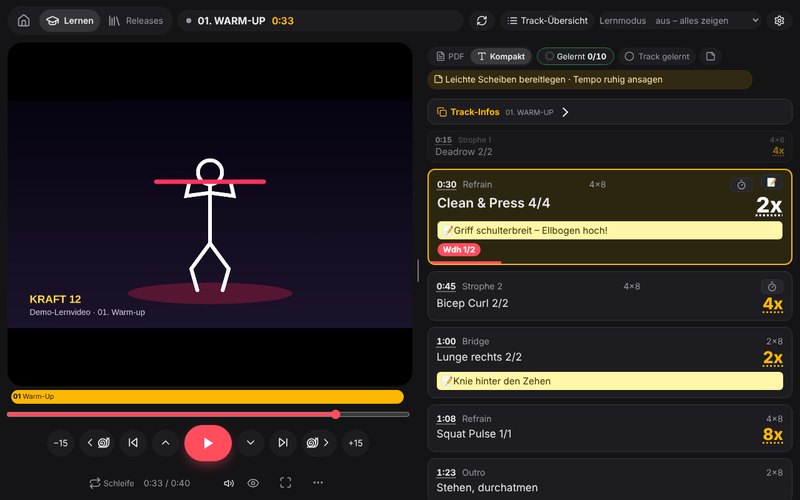
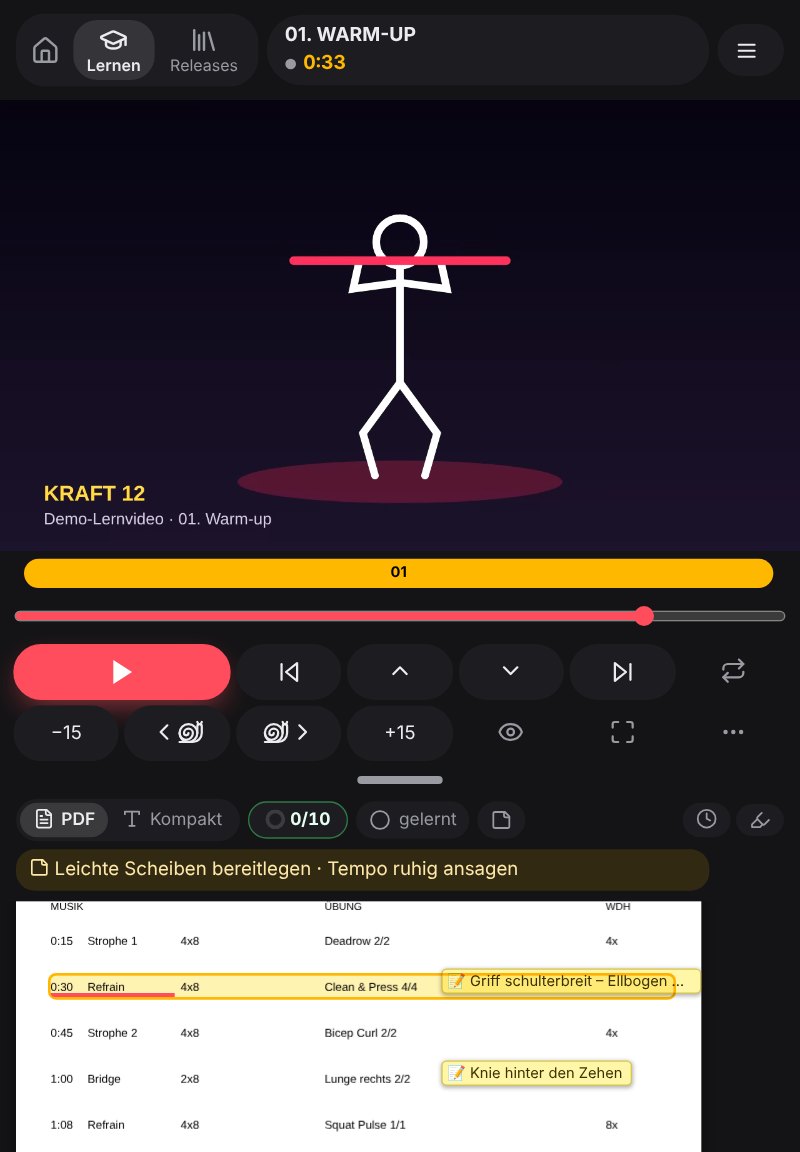
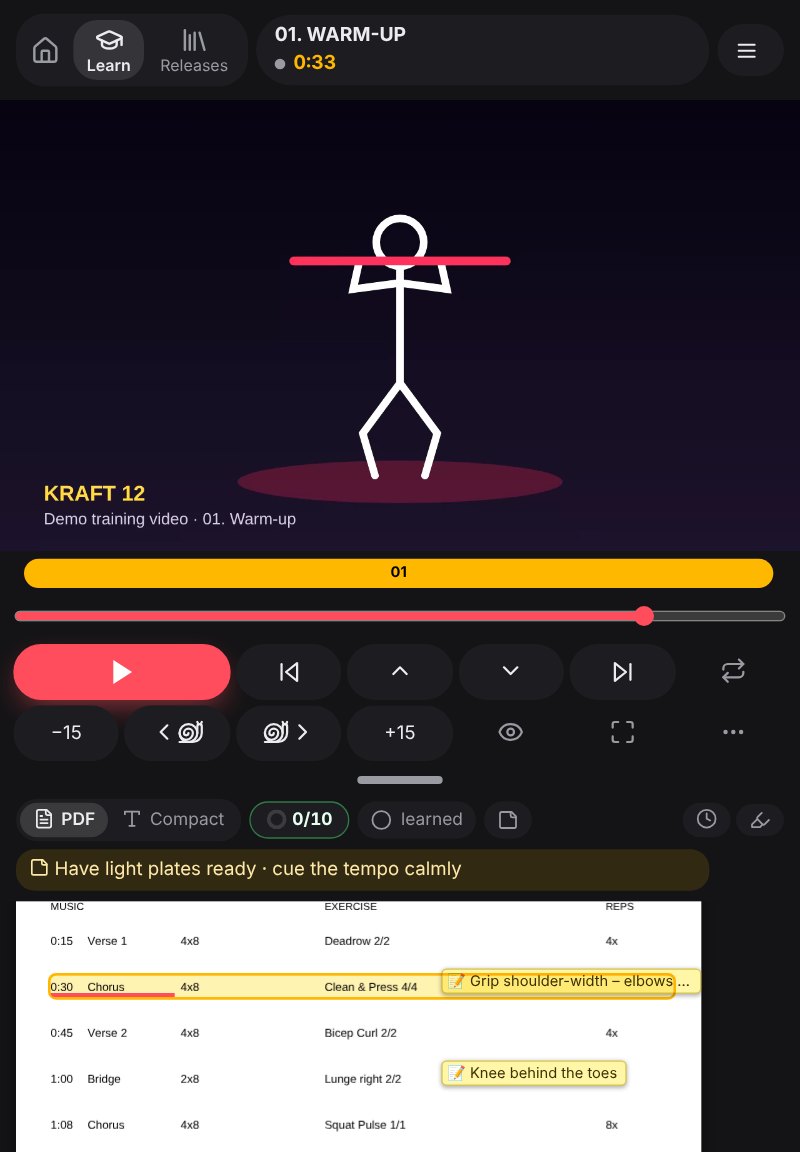
- Für vorchoreografierte Programme: Hast du Lernvideo und Choreo-Notes, laufen beide synchron – die aktuelle Zeile ist markiert
- Tracks im Video werden automatisch erkannt
- Im Takt der Musik: Cuemira versucht, den Takt aus der Musik herauszuhören – Zeilenwechsel und Wiederholungen laufen dann meist näher am Count
- Kompaktansicht: die ganze Choreo groß, Wiederholungen daneben
- Übung antippen – Technik, Coaching und Glossar dazu direkt aufrufen
- Lernmodus: Choreo abdecken und spicken
- Zeitlupe vor und zurück – eine Bewegung in Ruhe nachvollziehen
- Lernfortschritt im Blick – welche Tracks schon sitzen, für Voll, 45 oder 30 Min
- Auch ohne Lernvideo: nur Musik und Choreo-Notes? Dann lernst du mit der Musik, Track für Track
- Auf dem Fernseher: Lernvideo samt aktueller Choreo-Zeile per Chromecast oder AirPlay – das Handy wird zur Fernbedienung
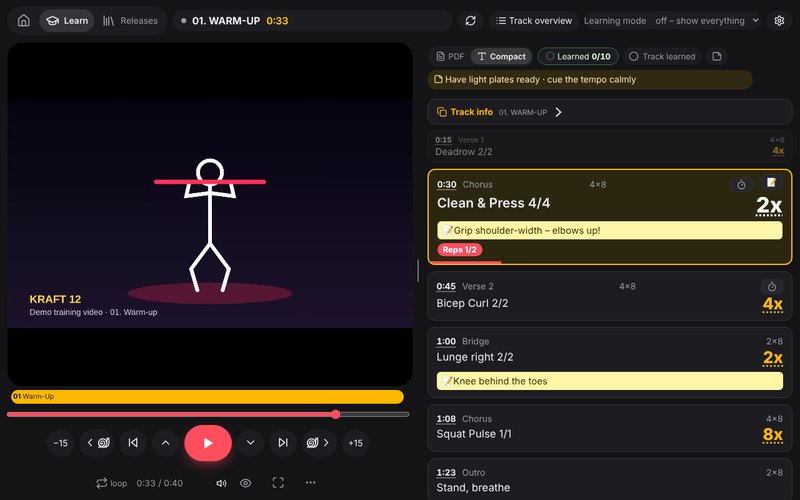
- For pre-choreographed programmes: if you have a training video and choreo notes, both run in sync – the current line is highlighted
- Tracks in the video are detected automatically
- In time with the music: Cuemira tries to pick out the beat in the music – line changes and repetitions then usually follow the count more closely
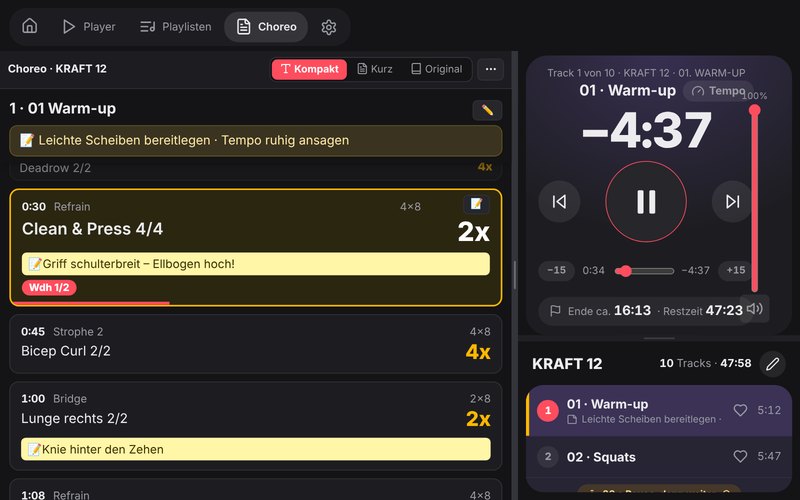
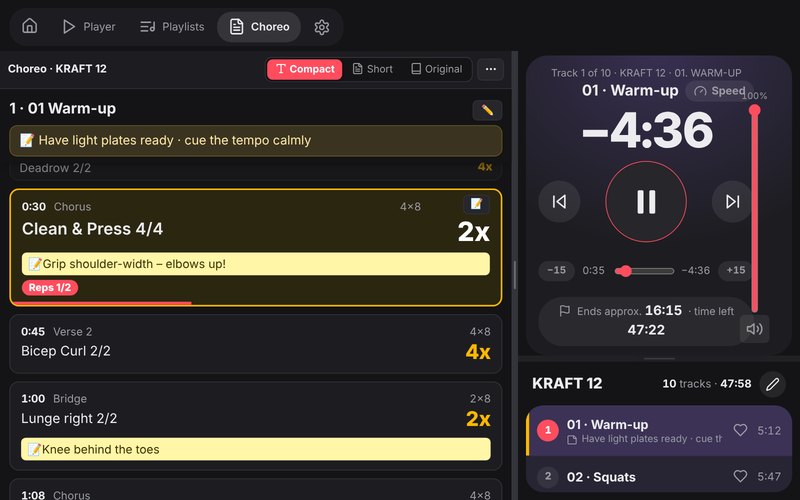
- Compact view: the whole choreo in large type, repetitions alongside
- Tap an exercise – open its technique, coaching and glossary right away
- Learning mode: cover the choreo and peek
- Slow motion forwards and backwards – follow a move at your own pace
- Learning progress at a glance – which tracks you already know, for full, 45 or 30 min
- Even without a training video: only music and choreo notes? Then you learn with the music, track by track
- On your TV: training video with the current choreo line via Chromecast or AirPlay – your phone becomes the remote
PlanenPlan
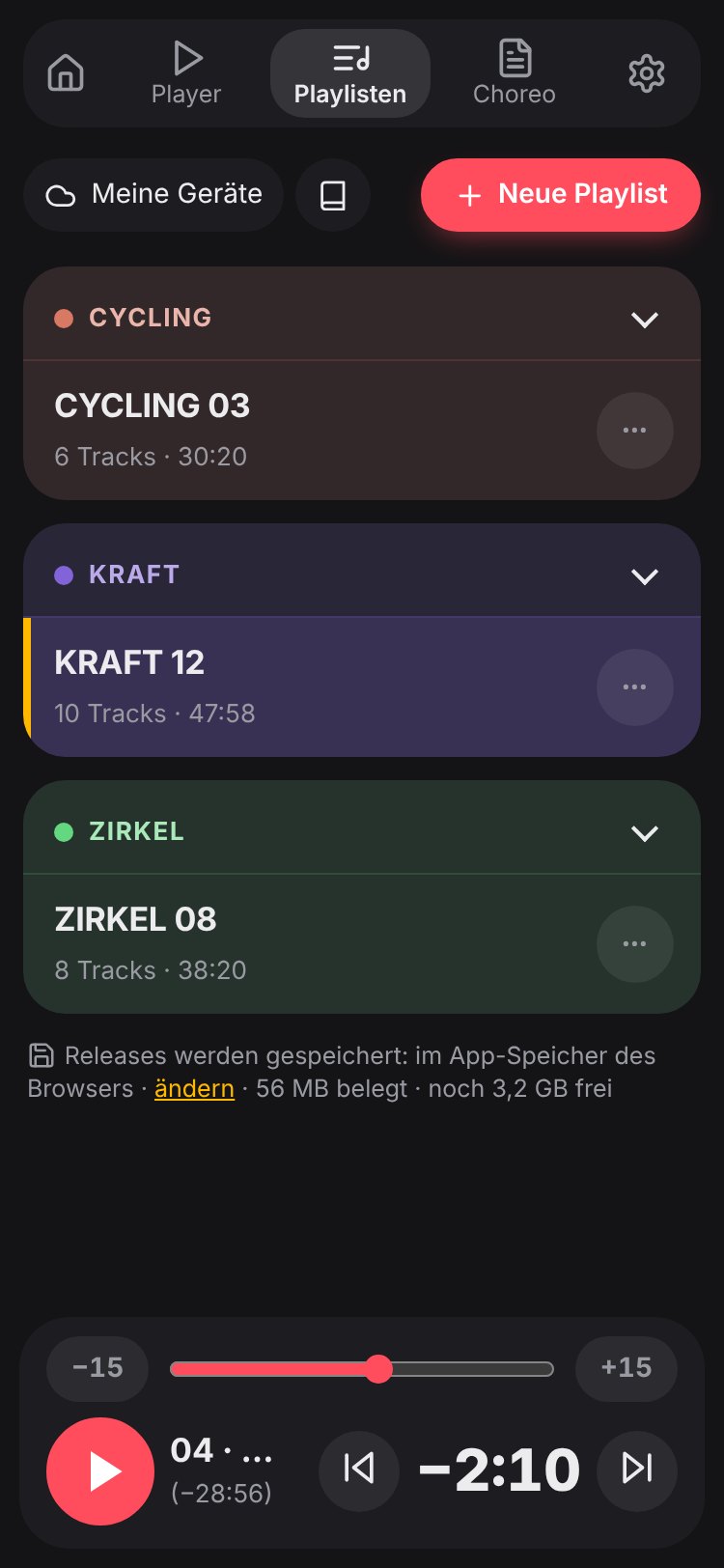
- Playlist für ein Release mit einem Tipp – inkl. 45- und 30-Min-Format
- Mixen: Tracks aus verschiedenen Releases kombinieren – die Choreo dazu stellt Cuemira automatisch zusammen
- Mix-Vorschlag: Cuemira stellt einen Mix zusammen – aus deinen Lieblingstracks oder zum Überraschen, bevorzugt Tracks, die du lange nicht unterrichtet hast
- Kurs-Tagebuch: wann du welche Playlist wo unterrichtet hast – trägt sich von selbst ein
- Playlisten teilen per Link oder QR-Code – beim Empfänger dessen eigenen Releases zugeordnet
- Gewichte & Setup aller Tracks auf einen Blick (bei Programmen mit Gewichten)
- Eigene Notizen je Track oder genau an einer Choreo-Zeile
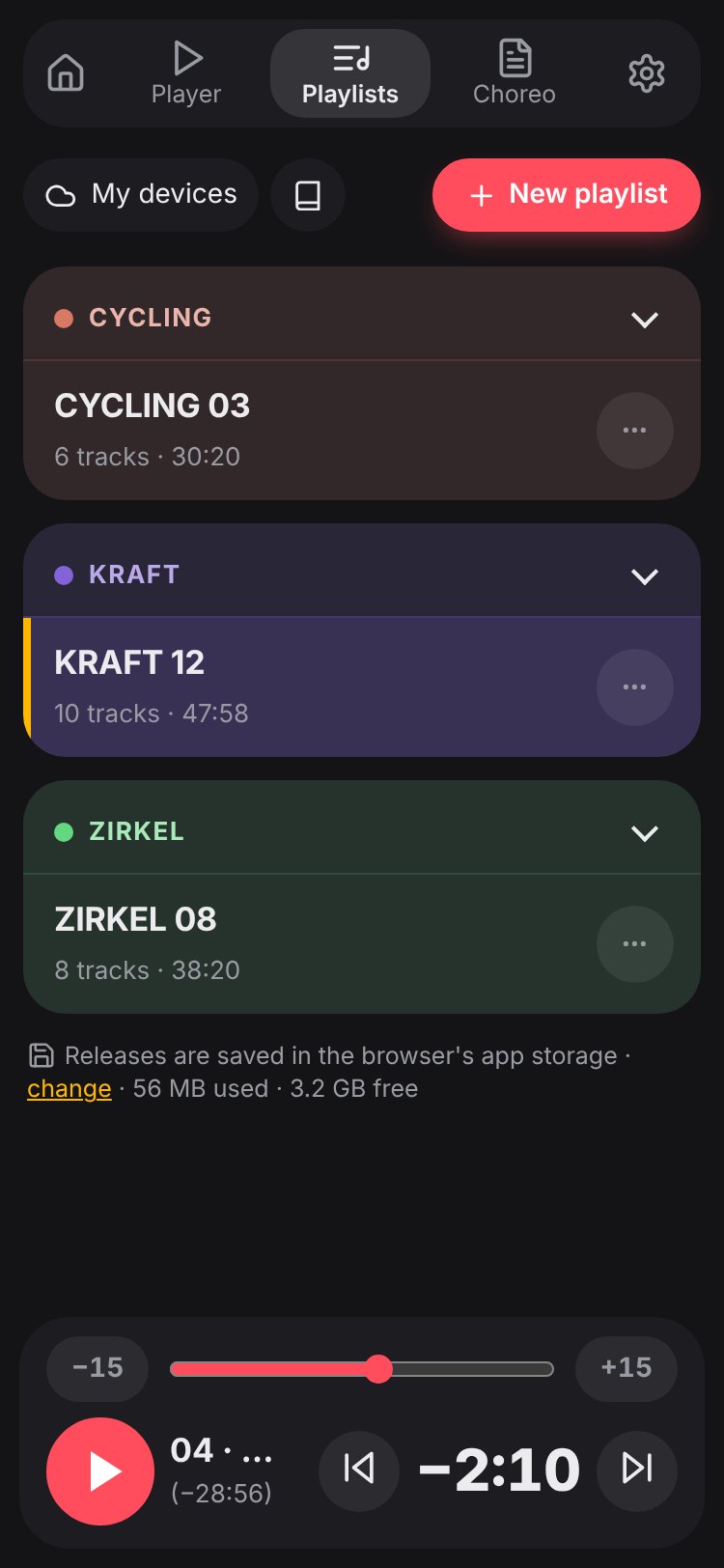
- A playlist for a release in one tap – incl. 45 and 30 min formats
- Mix tracks from different releases – Cuemira puts the matching choreo together automatically
- Mix suggestion: Cuemira puts together a mix – from your favourite tracks or as a surprise, preferring tracks you haven’t taught for a long time
- Class diary: when you taught which playlist and where – fills itself in
- Share playlists via link or QR code – matched to the recipient’s own releases
- Weights & setup of all tracks at a glance (for programmes with weights)
- Your own notes per track or right at a choreo line
UnterrichtenTeach
- Die Choreo läuft kompakt mit – groß lesbar, mit deinen Notizen
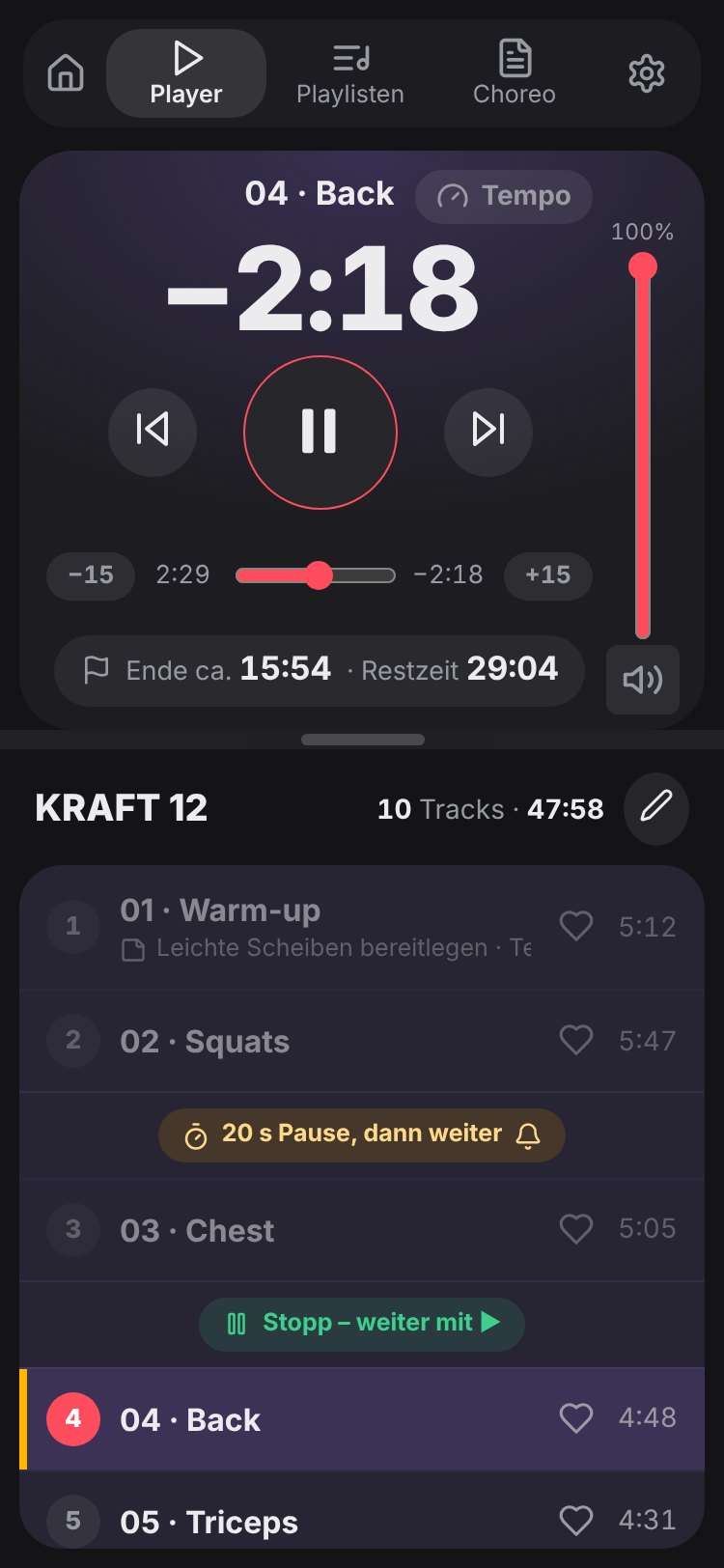
- Große Restzeit und Kursende als Uhrzeit
- Countdown zum nächsten Track – mit Gewichtswahl (falls verfügbar)
- Lautstärke angleichen, Cooldown auf Wunsch leiser
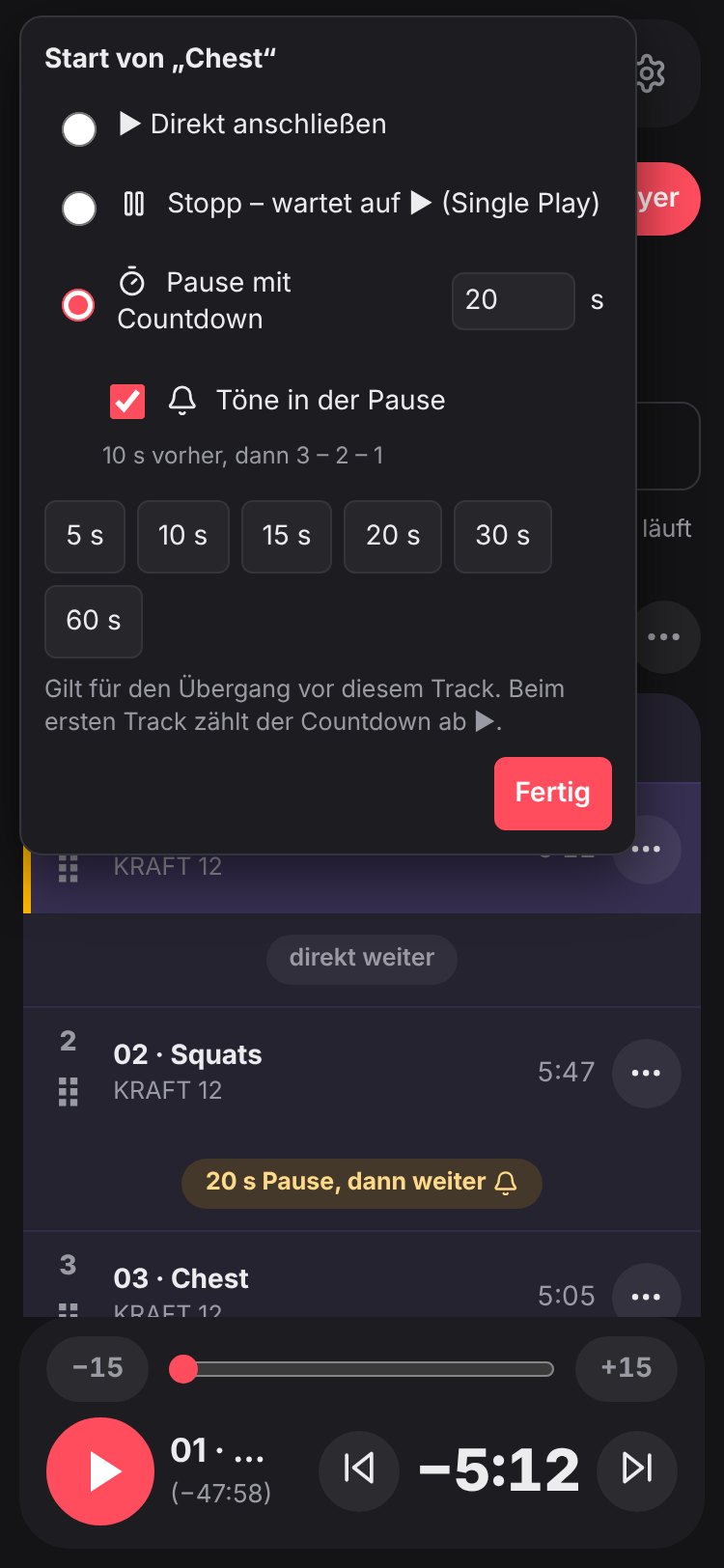
- Pausen mit Countdown: Länge frei einstellbar, auf Wunsch mit Tönen bis 3 – 2 – 1
- Bluetooth-Verzögerung ausgleichen – je Studio einmal einmessen, dann passt alles zum Gehörten
- The choreo runs along in compact form – easy to read, with your notes
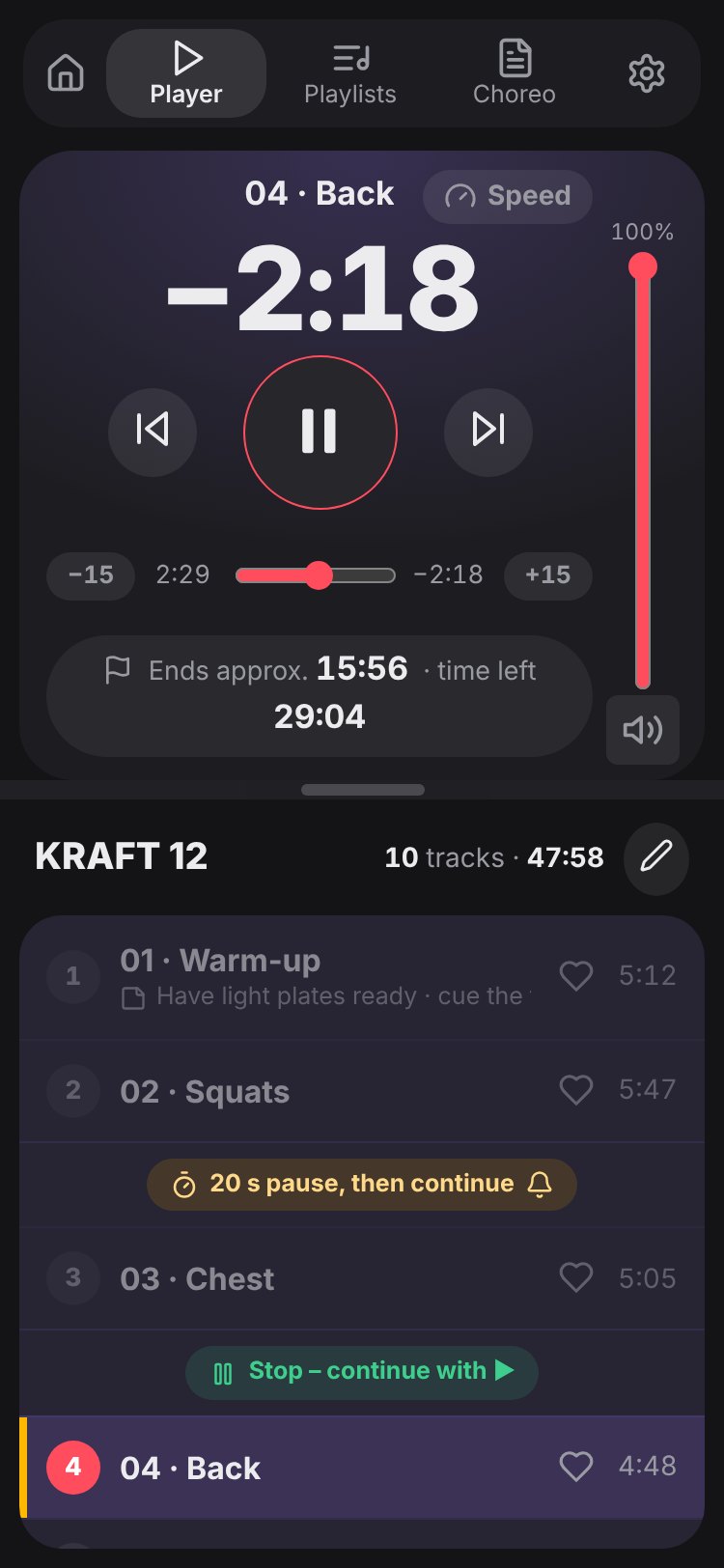
- Large remaining time and class end as clock time
- Countdown to the next track – with weight choice (if available)
- Level the volume, cool-down quieter if you like
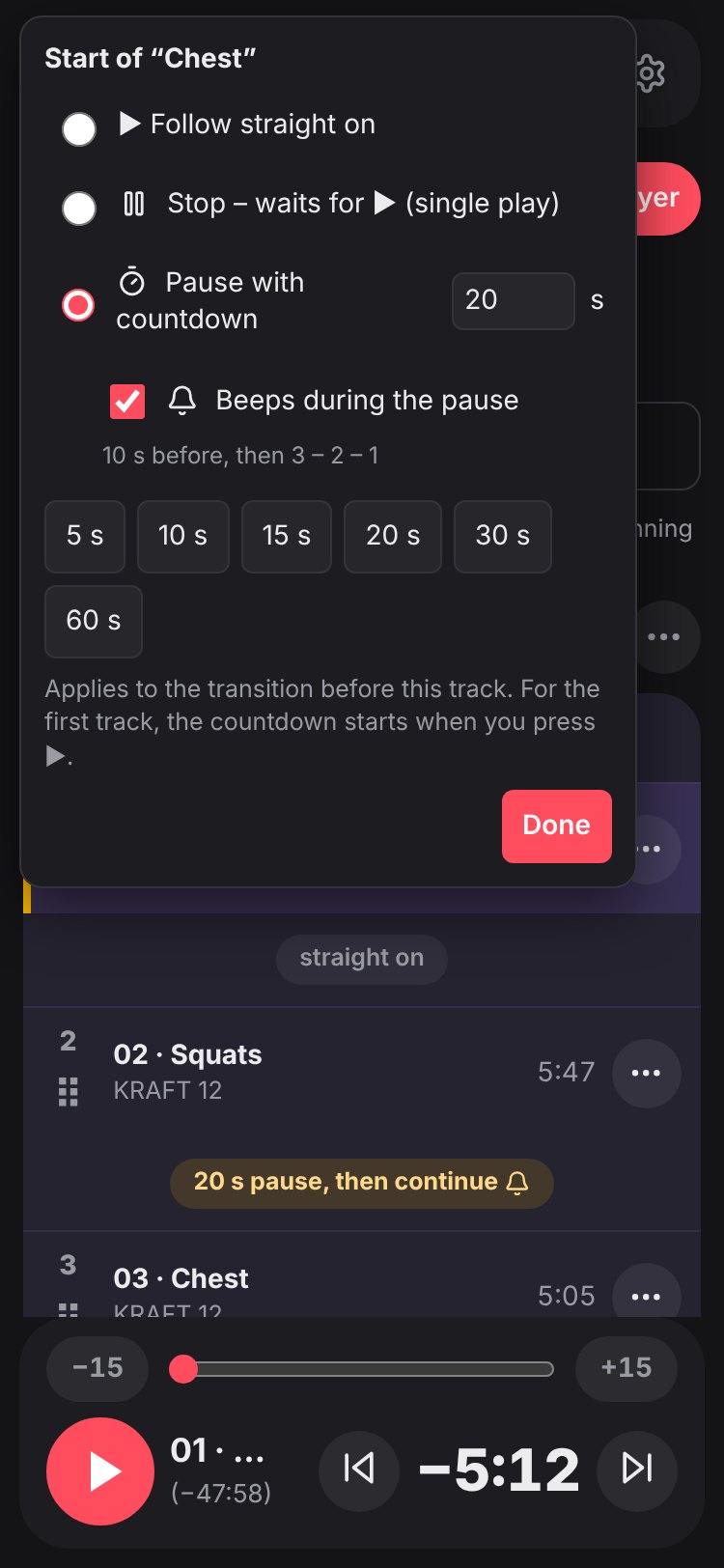
- Breaks with countdown: any length you like, with beeps down to 3 – 2 – 1 if you want
- Compensate for Bluetooth delay – calibrate once per studio, then everything matches what you hear
So sieht Cuemira ausThis is what Cuemira looks like
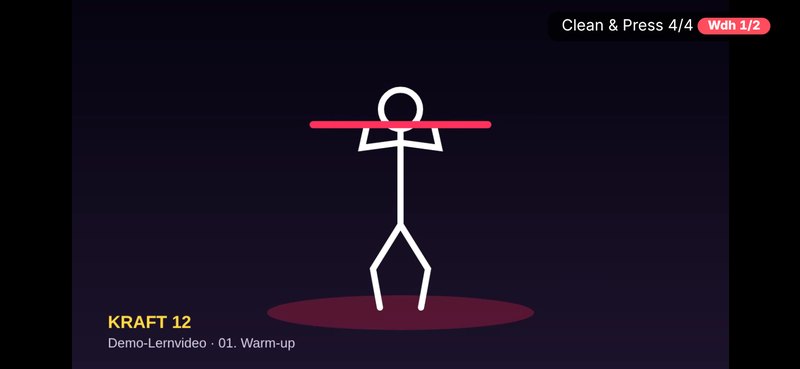
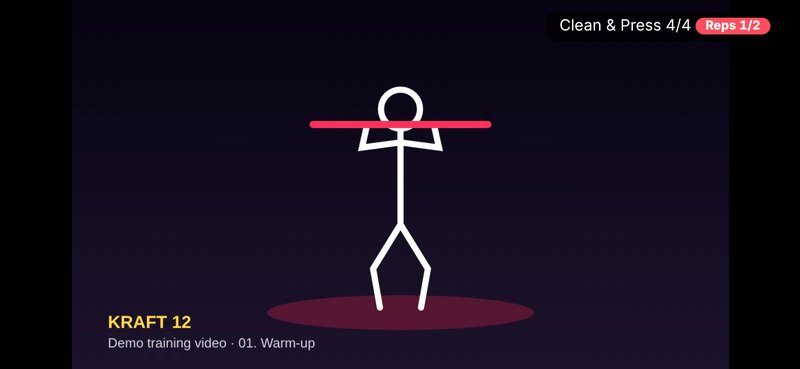
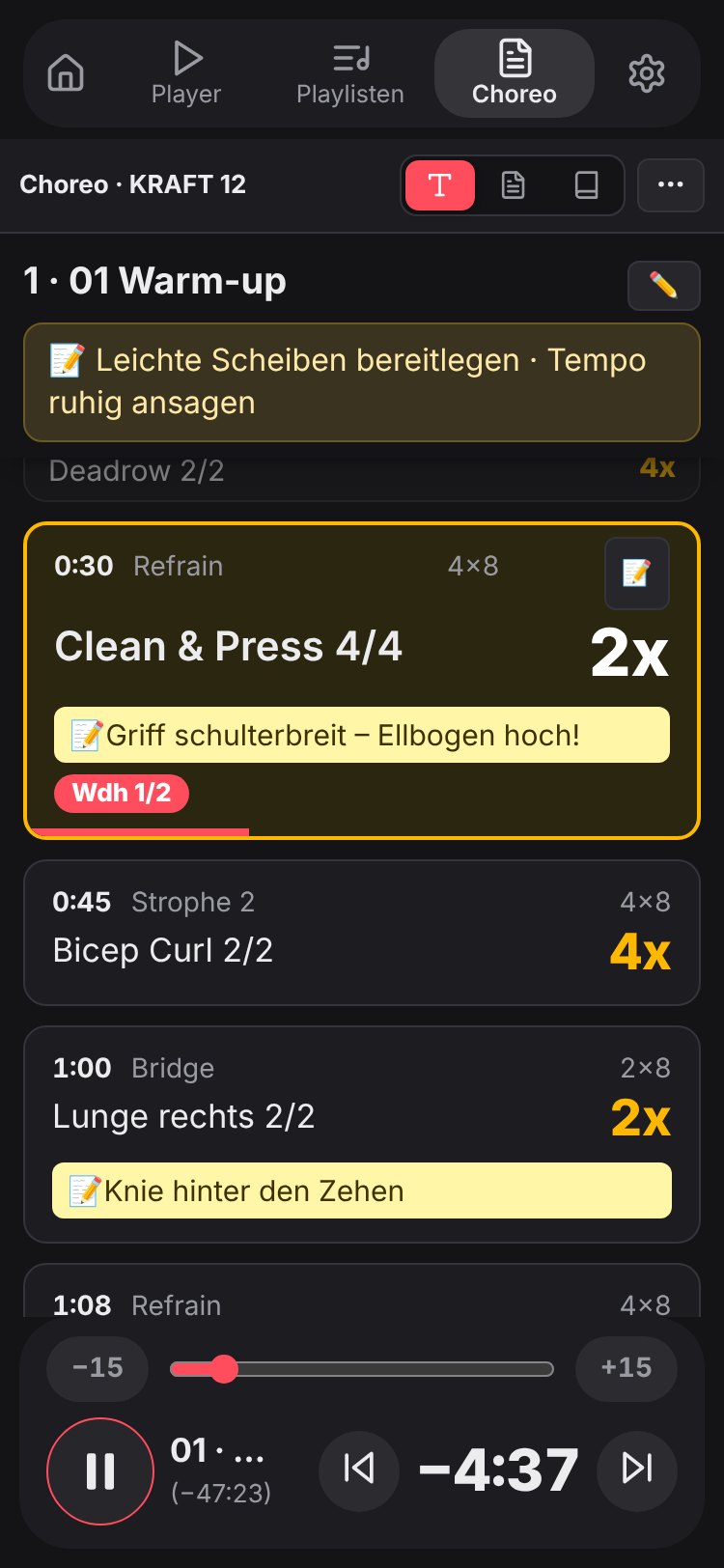
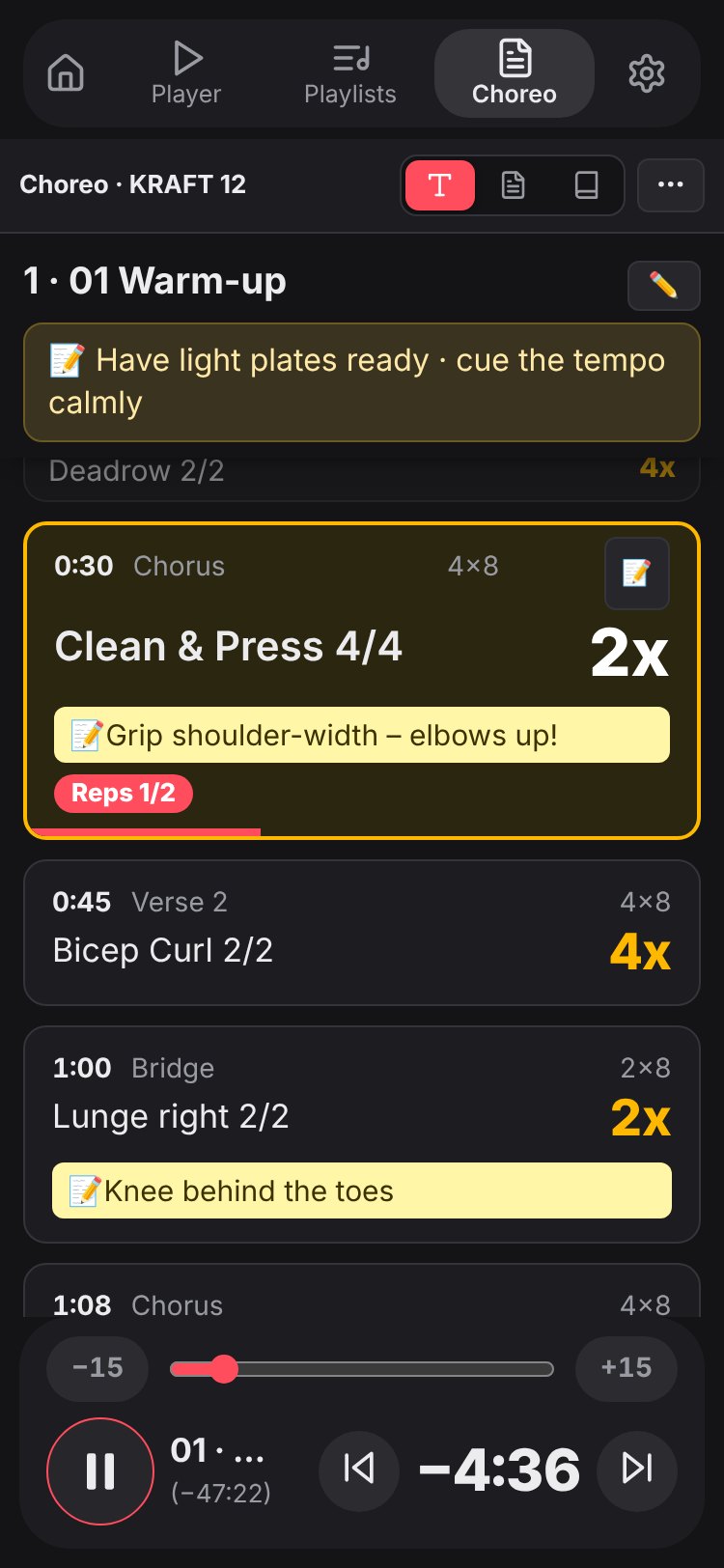
Echte Ansichten aus der App – am PC, am Tablet und am Handy. Gezeigt mit Beispiel-Releases und einem selbst gezeichneten Lernvideo.Real views from the app – on PC, tablet and phone. Shown with sample releases and a self-drawn training video.
Die kleinen Dinge, die den Unterschied machenThe little things that make the difference
Kurs-Tagebuch
Class diary
Cuemira trägt jede Stunde von selbst ein – wann, welche Playlist, welche Tracks, wo. „Zuletzt unterrichtet“ steht gleich in der Übersicht.
Cuemira logs every class by itself – when, which playlist, which tracks, where. “Last taught” shows right in the overview.
Mix-Vorschlag
Mix suggestion
Programm und Format wählen – Cuemira stellt den Mix aus deinen Releases zusammen – auf Wunsch auch aus denen in deiner Cloud: aus deinen Lieblingstracks oder „Überrasch mich“, bevorzugt Tracks, die lange nicht dran waren. Einzelne Plätze neu würfeln – die Tracks laufen durch wie beim einarmigen Banditen.
Pick programme and format – Cuemira builds the mix from your releases – including the ones in your cloud if you like: from your favourite tracks or “surprise me”, preferring tracks you haven’t done for a while. Re-roll single positions – the tracks spin like a slot machine.
Lieblingstracks
Favourite tracks
Tracks, die du gern unterrichtest, mit einem Herz merken – im Player, in der Playlist oder unter Releases. Beim Würfeln (Mix-Vorschlag, Track austauschen) dann einfach „aus Lieblingstracks“ wählen. Auf all deinen Geräten.
Mark the tracks you love to teach with a heart – in the player, in the playlist or under Releases. When rolling the dice (mix suggestion, swap track) just choose “from favourite tracks”. On all your devices.
Lernen ohne Lernvideo
Learn without a training video
Nur Musik und Choreo-Notes? Dann läuft die Choreo zur Musik mit – mit Lernmodus, Wiederholungen, Tempo und Schleife.
Only music and choreo notes? Then the choreo runs along with the music – with learning mode, repetitions, tempo and loop.
Bluetooth-Verzögerung
Bluetooth delay
Bluetooth-Boxen spielen den Ton später ab. Je Studio einmal einmessen – dann laufen Zähler, Choreo-Zeile und Countdown im Takt.
Bluetooth speakers play the sound later. Calibrate once per studio – then counter, choreo line and countdown stay in time.
Deine Notizen in der Choreo
Your notes in the choreo
Notizen für einen ganzen Track oder genau an einer Zeile, dazu Textmarker – beim Lernen und im Kurs in der Kompakt-Choreo direkt dabei.
Notes for a whole track or right at a single line, plus highlighter – right there in the compact choreo while learning and in class.
Pausen & Stopps zwischen den Tracks
Breaks & stops between tracks
Für jeden Übergang wählbar: direkt weiter, Stopp bis ▶ oder Pause mit Countdown – auf Wunsch mit Tönen bis 3 – 2 – 1.
Choose for every transition: straight on, stop until ▶ or a break with countdown – with beeps down to 3 – 2 – 1 if you like.
Kurs-Check
Class check
Vor dem Kurs meldet Cuemira von selbst, wenn etwas nicht passt – Musik fehlt, Ton aus, Tempo nicht 1×, Akku fast leer. Das meiste behebst du mit einem Tipp.
Before class, Cuemira tells you if something is off – music missing, sound off, tempo not 1×, battery low. Most of it is fixed with one tap.
Alle Tracks gleich laut
All tracks equally loud
Lautstärke angleichen bringt alle Tracks einer Playlist auf eine Lautstärke – so laut, wie es ohne Übersteuern geht. Die Anlage stellst du einmal ein; einzelne Tracks hebst du bei Bedarf wieder an.
Level volume brings all tracks in a playlist to one volume – as loud as possible without clipping. Set the sound system once; raise single tracks again if needed.
Im Takt der Musik
In time with the music
Ist die Musik des Releases auf dem Gerät, versucht Cuemira, den Takt herauszuhören – Zeilenwechsel und Wiederholungen laufen dann meist näher am Count. Passt eine Zeit in den Choreo-Notes nicht zur Musik, weist Cuemira darauf hin.
If the release’s music is on your device, Cuemira tries to pick out the beat – line changes and repetitions then usually follow the count more closely. If a time in the choreo notes doesn’t seem to match the music, Cuemira points it out.
Choreo-Notes korrigieren
Correct the choreo notes
Eigene Zeiten mit ⏱ setzen, genau wenn die Zeile im Video beginnt – sie gelten auch im Musikplayer, stehen im gedruckten PDF und gleichen sich über deine Geräte ab.
Set your own times with ⏱ exactly when the line starts in the video – they also apply in the music player, appear in the printed PDF and sync across your devices.
Wiederholungs-Zähler
Repetition counter
Zählt beim Lernen und im Kurs live mit (3/8) – mit der Musik auf dem Gerät meist im Takt – und springt bei „Wdh. Block 1“ zurück, mit L und R getauscht.
Counts along live while learning and in class (3/8) – with the music on your device usually in time – and jumps back on “repeat block 1”, with left and right swapped.
Technik & Coaching
Technique & coaching
Track-Infos aus den Choreo-Notes zum Aufklappen – eine gepunktet unterstrichene Übung antippen springt direkt zu ihrem Coaching und ins Glossar.
Track info from the choreo notes to expand – tap an exercise with a dotted underline to jump straight to its coaching and the glossary.
Üben in Schleife
Practise in a loop
Zeile, Track oder Abschnitt wiederholen, beim Lernen dazu Zeitlupe vor und zurück – im Musikplayer auch mit Tempo von 0,75× bis 2×.
Repeat a line, track or section, plus slow motion forwards and backwards while learning – in the music player also at a tempo from 0.75× to 2×.
Track austauschen
Swap a track
Denselben Track aus einem anderen Release einsetzen – mit Reinhören, Blick in die Choreo und neuer Gesamtzeit. Auch aus Releases, die nur in deiner Cloud liegen: Cuemira holt sie beim Übernehmen aufs Gerät.
Use the same track from another release – with preview, a look at the choreo and the new total time. Even from releases that are only in your cloud: Cuemira fetches them to the device when you take one.
Musik vor & nach dem Kurs
Music before & after class
Eigene Musik je Playlist für vor und nach der Stunde – offline, direkt aus Cuemira.
Your own music per playlist for before and after class – offline, right from Cuemira.
Uhr-App für Wear OS & Apple Watch
Watch app for Wear OS & Apple Watch
Restzeit, Kursende, Play/Pause, Track vor/zurück, Lautstärke über die Krone und Playlist wählen – direkt am Handgelenk. Vibriert kurz vor Trackende.
Time left, class end, play/pause, previous/next track, volume on the crown and playlist choice – right on your wrist. Vibrates shortly before a track ends.
Playlisten teilen
Share playlists
Per Link oder QR-Code an Kolleginnen und Kollegen – beim Empfänger den eigenen Releases zugeordnet.
Send via link or QR code to colleagues – matched to their own releases on arrival.
Meine Geräte
My devices
Playlisten, Notizen und Lernfortschritt über deine eigene Dropbox, OneDrive oder pCloud abgleichen.
Sync playlists, notes and learning progress through your own Dropbox, OneDrive or pCloud.
Releases holen
Fetch releases
Aus Cloud, iCloud Drive, NAS, Ordner oder ZIP – Musik-ZIPs werden entpackt, fehlende Releases kommen von selbst.
From the cloud, iCloud Drive, NAS, a folder or ZIP – music ZIPs are unpacked, missing releases arrive by themselves.
Choreo als PDF
Choreo as PDF
Die Choreo zur Playlist als ein PDF zum Speichern oder Drucken – mit Deckblatt und Ablauf.
The choreo for your playlist as one PDF to save or print – with cover page and running order.
So legst du losHow to get started
Öffnen & installieren
Open & install
Als App aus dem Store laden:
Get the app from the store:
Oder cuemira.app/app im Browser öffnen – fertig. Auf den Startbildschirm:
Or open cuemira.app/app in your browser – done. On your home screen:
- iPhone/iPad: in Safari „Teilen“ (neues Safari: erst ••• bzw. Menü-Symbol in der Adressleiste) → „Zum Home-Bildschirm“
- Android: Chrome-Menü → „App installieren“
- PC: Installieren-Symbol in der Adresszeile
- iPhone/iPad: in Safari “Share” (new Safari: first ••• or the menu icon in the address bar) → “Add to Home Screen”
- Android: Chrome menu → “Install app”
- PC: install icon in the address bar
Releases hinzufügen
Add your releases
Deine Musik – vom Gerät, aus der Cloud oder eigene Musik, z. B. von einer CD. Releases erkennt Cuemira am Namen (Programm und Nummer); eigene Musik benennst du selbst, z. B. „SPINNING 01“. Choreo-Notes und Lernvideo kommen auf Wunsch dazu.
Your music – from your device, from the cloud or your own, e.g. from a CD. Cuemira recognises releases by their name (programme and number); your own music you name yourself, e.g. “SPINNING 01”. Choreo notes and training video can be added if you like.
- aus einem Ordner, vom NAS oder als ZIP
- aus Dropbox, OneDrive, pCloud
- am iPhone/iPad aus iCloud Drive – über die Dateien-App
- from a folder, a NAS or as a ZIP
- from Dropbox, OneDrive, pCloud
- on iPhone/iPad from iCloud Drive – via the Files app
Playlist – und los
Playlist – and go
Ein Tipp macht aus einem Release eine Playlist, oder du mixt deine eigene. Im Kurs: großer Play-Knopf, Countdown, Restzeit – und die Choreo läuft mit.
One tap turns a release into a playlist, or mix your own. In class: big play button, countdown, remaining time – and the choreo follows along.
Schon auf einem anderen Gerät? ☁ Meine Geräte holt alles herüber.
Already on another device? ☁ My devices brings everything over.
Deine Daten bleiben bei dirYour data stays with you
- Alles auf deinem Gerät – Playlisten, Notizen, Musik, Videos und PDFs werden nirgends hochgeladen.
- Kein Konto, keine Werbung, kein Tracking – und keine Cookies.
- Deine Cloud bleibt deine – verbindest du Dropbox, OneDrive oder pCloud, spricht dein Gerät direkt mit dem Anbieter.
- Everything on your device – playlists, notes, music, videos and PDFs are never uploaded.
- No account, no ads, no tracking – and no cookies.
- Your cloud stays yours – if you connect Dropbox, OneDrive or pCloud, your device talks directly to the provider.
Häufige FragenFrequently asked questions
AllgemeinGeneral
Was kostet Cuemira?How much does Cuemira cost?
Nichts. Cuemira ist kostenlos, ohne Abo und ohne Werbung.
Nothing. Cuemira is free, with no subscription and no ads.
Gehört Cuemira zu Les Mills?Is Cuemira part of Les Mills?
Nein. Cuemira ist ein privates Hilfsmittel von einem Instruktor für Instruktoren und steht in keiner Verbindung zu Les Mills International.
No. Cuemira is a private tool made by an instructor for instructors and is not affiliated with Les Mills International.
Sind Musik, Videos und Choreo-Notes dabei?Are music, videos and choreo notes included?
Nein. Cuemira ist das Werkzeug – die Inhalte bringst du selbst mit, z. B. als lizenzierte Instruktorin oder lizenzierter Instruktor. Sie bleiben auf deinem Gerät bzw. in deiner eigenen Cloud.
No. Cuemira is the tool – you bring the content yourself, e.g. as a licensed instructor. It stays on your device or in your own cloud.
Welche Programme werden unterstützt?Which programmes are supported?
Alle: Musikplayer und Playlisten funktionieren für jedes Programm – auch mit eigener Musik. Für Les-Mills-Programme liest Cuemira zusätzlich Choreo-Notes, Formate und Gewichte; das wählst du beim ersten Start oder unter ⚙ → Programme.
All of them: the music player and playlists work for any programme – with your own music too. For Les Mills programmes Cuemira also reads choreo notes, formats and weights; you choose that on first start or under ⚙ → Programmes.
Kann ich eigene Musik verwenden?Can I use my own music?
Ja. Unter „Musik hinzufügen“ wählst du beliebige Musikdateien vom Gerät, z. B. von einer CD – oder du öffnest unter „Aus der Cloud“ deine Dropbox, OneDrive oder pCloud und hakst Musikdateien oder ganze Ordner an. Du gibst Programm und Nummer an (z. B. „CYCLING 01“), Cuemira nummeriert die Tracks – danach geht alles wie gewohnt: Playlist, Countdown, Austauschen.
Yes. Under “Add music” you pick any music files from your device, e.g. from a CD – or open your Dropbox, OneDrive or pCloud under “From the cloud” and tick music files or whole folders. You enter programme and number (e.g. “CYCLING 01”), Cuemira numbers the tracks – then everything works as usual: playlist, countdown, swapping.
Brauche ich ein Konto?Do I need an account?
Nein. Du öffnest die App und legst los. Nur wenn du deine Geräte abgleichen willst, verbindest du deine eigene Dropbox, OneDrive oder pCloud.
No. Just open the app and start. Only if you want to sync your devices do you connect your own Dropbox, OneDrive or pCloud.
Auf welchen Geräten läuft es?Which devices does it run on?
In jedem aktuellen Browser: iPhone, iPad, Android-Handy und -Tablet, Windows, Mac – sogar im Browser mancher Autos.
In any current browser: iPhone, iPad, Android phone and tablet, Windows, Mac – even in some car browsers.
Funktioniert Cuemira ohne Internet?Does Cuemira work without internet?
Ja. Einmal geöffnet bzw. installiert und mit deinen Releases gefüllt, läuft Cuemira im Kursraum auch ohne Netz.
Yes. Once opened or installed and filled with your releases, Cuemira runs in the studio even without a connection.
Brauche ich zum Lernen das Lernvideo?Do I need the training video to learn?
Nein. Hast du nur Musik und Choreo-Notes, lernst du mit der Musik: Die Choreo läuft Track für Track mit – mit Lernmodus, Wiederholungs-Zähler, Tempo und Schleife. Mit Video siehst du zusätzlich die Bewegungen.
No. If you only have music and choreo notes, you learn with the music: the choreo runs along track by track – with learning mode, repetition counter, tempo and loop. With the video you also see the moves.
Kann ich auf dem Fernseher lernen?Can I learn on my TV?
Ja – mit der App für Android oder iPhone. Beim Lernen oben rechts im Video auf das Cast-Symbol tippen (am iPhone: AirPlay): Per Chromecast (Android und iPhone) oder AirPlay (iPhone, iPad) zeigt der Fernseher das Lernvideo groß, darunter die aktuelle Choreo-Zeile mit Wiederholungen. Das Handy bleibt die Fernbedienung – Abspielen, Springen und Zeitlupe wirken auf beide. Choreo-Zeile, Untertitel und Tonspur lassen sich im 📺-Fenster wählen. Handy und Fernseher müssen im selben WLAN sein. Im Browser geht am iPhone nur das Video per AirPlay.
Yes – with the app for Android or iPhone. While learning, tap the cast symbol at the top right of the video (on iPhone: AirPlay): via Chromecast (Android and iPhone) or AirPlay (iPhone, iPad) the TV shows the training video large, with the current choreo line and repetitions below. Your phone stays the remote – play, skip and slow motion apply to both. Choreo line, subtitles and audio track can be chosen in the 📺 window. Phone and TV need to be on the same Wi-Fi. In the browser on an iPhone only the video goes to AirPlay.
Gibt es Cuemira für die Uhr?Is there Cuemira for my watch?
Ja, ab Version 12 – für Wear OS (z. B. Galaxy Watch, Pixel Watch) und die Apple Watch. Die Uhr ist die Fernbedienung für Cuemira am Handy: Die Musik läuft am Handy, die Uhr zeigt Restzeit und Kursende und steuert Play/Pause, Tracks, Lautstärke und die Wahl der Playlist; kurz vor Trackende vibriert sie. Wear OS: auf der Uhr aus Google Play (Android) installieren. Apple Watch: kommt mit der iPhone-App aus dem App Store (Apple). Die Uhr-App braucht die App am Handy – mit der Web-App im Browser geht sie nicht.
Yes, from version 12 – for Wear OS (e.g. Galaxy Watch, Pixel Watch) and Apple Watch. The watch is the remote for Cuemira on your phone: the music plays on the phone, the watch shows time left and class end and controls play/pause, tracks, volume and choosing a playlist; it vibrates shortly before a track ends. Wear OS: install it on the watch from Google Play (Android). Apple Watch: it comes with the iPhone app from the App Store (Apple). The watch app needs the app on your phone – it doesn't work with the web app in the browser.
Hilfe zur AppHelp with the app
Wie installiere ich Cuemira als App – und wozu?How do I install Cuemira as an app – and why?
Am einfachsten: Cuemira bei Google Play (Android) oder im App Store (iPhone, iPad) laden.
Oder aus dem Browser: Installiert startet Cuemira wie eine App vom Startbildschirm – ohne Adresszeile und auch offline. So geht’s:
Easiest: get Cuemira on Google Play (Android) or the App Store (iPhone, iPad).
Or from the browser: installed, Cuemira starts like an app from your home screen – without the address bar and offline too. Here’s how:
- Android (Chrome): Öffnest du Cuemira im Browser, zeigt die Startseite „📲 Cuemira als App installieren“ – auf „📲 Installieren“ tippen. Sonst: Chrome-Menü ⋮ → „App installieren“.
- iPhone/iPad (Safari): erst cuemira.app/app öffnen (nicht diese Seite), dann „Teilen“ (Quadrat mit Pfeil nach oben; im neuen Safari mit schmaler Adressleiste erst ••• bzw. das Menü-Symbol links darin) → „Zum Home-Bildschirm“ → „Als Web-App öffnen“ an lassen → „Hinzufügen“. Am besten gleich beim ersten Öffnen: Safari und die App vom Home-Bildschirm haben getrennte Daten.
- PC (Chrome, Edge): das Installieren-Symbol rechts in der Adresszeile.
- Android (Chrome): if you open Cuemira in the browser, the start screen shows “📲 Install Cuemira as an app” – tap “📲 Install”. Otherwise: Chrome menu ⋮ → “Install app”.
- iPhone/iPad (Safari): first open cuemira.app/app (not this page), then “Share” (square with an arrow pointing up; in the new Safari with the slim address bar first ••• or the menu icon on its left) → “Add to Home Screen” → leave “Open as Web App” on → “Add”. Best right when you first open it: Safari and the home-screen app keep separate data.
- PC (Chrome, Edge): the install icon on the right of the address bar.
Später findest du die Anleitung in der App unter ⚙ Einstellungen → „📲 Als App installieren“.
Later you’ll find the instructions in the app under ⚙ Settings → “📲 Install as app”.
Wie lege ich meine Releases in der Cloud ab?How do I store my releases in the cloud?
So erkennt Cuemira deine Releases in Dropbox, OneDrive oder pCloud:
- Einen Hauptordner anlegen, z. B. Releases.
- Darin je Programm einen Ordner (z. B. KRAFT) und darin je Release einen Ordner mit der Nummer (12).
- In den Release-Ordner kommen die Choreo-Notes (PDF), die Musik und – wenn du damit lernen willst – das Video. Die Musik entpackt in einem Unterordner „…_Music“ oder einfach als Musik-ZIP.
- Heruntergeladene Dateien behalten einfach ihren Namen – Programm und Nummer stehen meist schon drin. Eigene Dateien so benennen, dass sie mit Programm und Nummer beginnen.
Releases/
  KRAFT/
    12/
      KRAFT 12 Choreo.pdf
      KRAFT 12 Video.mp4   (optional)
      KRAFT 12_Music/
        01 Warm-up.mp3 …
    11/ …
  CYCLING/
    03/ …
Dann in Cuemira „➕ Release hinzufügen → Aus der Cloud“, den Dienst wählen, anmelden und den Hauptordner nehmen. Unterordner werden mit durchsucht; neue Releases später mit „neu einlesen“. Die Anmeldung läuft direkt beim Anbieter – Cuemira liest dort nur.
This is how Cuemira recognises your releases in Dropbox, OneDrive or pCloud:
- Create a main folder, e.g. Releases.
- Inside it one folder per programme (e.g. KRAFT) and inside that one folder per release named by its number (12).
- The release folder holds the choreo notes (PDF), the music and – if you want to learn with it – the video. Music unpacked in a “…_Music” subfolder or simply as the music ZIP.
- Downloaded files simply keep their names – programme and number are usually already in them. Name your own files so they start with programme and number.
Releases/
  KRAFT/
    12/
      KRAFT 12 Choreo.pdf
      KRAFT 12 Video.mp4   (optional)
      KRAFT 12_Music/
        01 Warm-up.mp3 …
    11/ …
  CYCLING/
    03/ …
Then in Cuemira “➕ Add release → From the cloud”, pick the service, sign in and choose the main folder. Subfolders are searched too; add new releases later with “rescan”. Sign-in happens directly with the provider – Cuemira only reads there.
Wo verwalte ich meine Releases – und wie kommen Tracks in eine Playlist?Where do I manage my releases – and how do tracks get into a playlist?
Seit Version 6.0 liegt alles an einem Ort: Auf der Startseite unter „📦 Meine Releases“ fügst du Releases hinzu und siehst je Release, was auf dem Gerät ist – 🎬 Video, 🎵 Musik und 📄 Choreo-Notes mit Größe. Mit ▶ hörst du in die Tracks hinein, Fehlendes holst du dort, und mit 🗑 räumst du auf – z. B. nur das Video löschen, Musik und Notes bleiben.
Tracks kommen aus der Playlist heraus dazu: Playlist öffnen (✏️) → „➕ Tracks hinzufügen“, Release aufklappen, mit ▶ reinhören und mit ➕ übernehmen. „🎓 Choreo lernen“ zeigt die Releases nur noch zum Lernen – antippen und los.
Since version 6.0 everything is in one place: on the start screen under “📦 My releases” you add releases and see for each one what is on the device – 🎬 video, 🎵 music and 📄 choreo notes with their sizes. Preview the tracks with ▶, get what is missing, and tidy up with 🗑 – e.g. delete just the video, music and notes stay.
Tracks are added from within the playlist: open the playlist (✏️) → “➕ Add tracks”, open a release, preview with ▶ and take it with ➕. “🎓 Learn choreo” now only shows the releases for learning – tap and go.
Welche Dateien eines Releases braucht Cuemira – und wie viel Platz?Which files of a release does Cuemira need – and how much space?
- Choreo-Notes (PDF) – für die Choreo zum Mitlesen. Unter 1 MB.
- Musik – als Ordner oder als Musik-ZIP (wird beim Speichern entpackt). Rund 120–150 MB.
- Video – nur zum Lernen mit Bild, sonst nicht nötig. Meist 0,7–1 GB, manche deutlich mehr.
Für den Musikplayer reichen Notes und Musik. Faustregel: Auf 15 GB (z. B. pCloud oder Dropbox mit kostenlosem Speicher) passen etwa 100 Releases ohne Video – mit Video nur rund 15. Videos, die du nicht mehr brauchst, löschst du mit „Aufräumen“ (siehe unten).
- Choreo notes (PDF) – to read the choreo along. Under 1 MB.
- Music – as a folder or as a music ZIP (unpacked when saving). About 120–150 MB.
- Video – only for learning with pictures, otherwise not needed. Usually 0.7–1 GB, some much more.
For the music player notes and music are enough. Rule of thumb: 15 GB (e.g. a free cloud plan) holds about 100 releases without video – with video only around 15. Delete videos you no longer need with “Tidy up” (see below).
Wie kommen Playlisten und Musik auf mein anderes Gerät – z. B. über iCloud?How do playlists and music get onto my other device – e.g. via iCloud?
Dafür gibt es drei Wege – je nachdem, ob du dauerhaft abgleichen oder einmal übertragen willst:
There are three ways – depending on whether you want to stay in sync or transfer once:
- Automatisch über deine Cloud (Dropbox, OneDrive oder pCloud): unter „Meine Geräte“ auf jedem Gerät dasselbe Konto verbinden. Playlisten, Notizen und Lernfortschritt bleiben überall gleich – fehlende Musik und Choreo-Notes holt jedes Gerät selbst aus deinem Release-Ordner in der Cloud, auf Wunsch auch die Lernvideos. Fehlt dort ein Release, legt das Gerät, das es hat, Musik und Choreo-Notes von selbst hinein.
- Als Playlist-Paket – ideal mit iCloud Drive oder einem USB-Stick: Playlist → Teilen → „Als Paket speichern“. Musik, Choreo-Notes und deine Notizen landen in einer ZIP-Datei; auf dem anderen Gerät ➕ Neue Playlist → „Playlist-Paket“. Ohne Lernvideos.
- Per Link oder QR-Code: Playlist → Teilen. Überträgt nur die Playlist – die Releases müssen auf dem anderen Gerät schon da sein. Praktisch auch für Kolleginnen und Kollegen.
- Automatically via your cloud (Dropbox, OneDrive or pCloud): connect the same account on every device under “My devices”. Playlists, notes and learning progress stay the same everywhere – each device fetches missing music and choreo notes itself from your release folder in the cloud, and the training videos too if you like. If a release is missing there, the device that has it puts its music and choreo notes there by itself.
- As a playlist package – ideal with iCloud Drive or a USB stick: playlist → Share → “Save as a package”. Music, choreo notes and your notes go into one ZIP file; on your other device ➕ New playlist → “Playlist package”. Without training videos.
- Via link or QR code: playlist → Share. Transfers only the playlist – the releases must already be on the other device. Handy for colleagues too.
Deine Daten liegen dabei nie auf einem Server von Cuemira – nur auf deinen Geräten und in deiner eigenen Cloud.
Your data never sits on a Cuemira server – only on your devices and in your own cloud.
Wie bekomme ich Releases vom PC aufs Handy?How do I get releases from my PC onto my phone?
Am bequemsten über die Cloud: Releases am PC in deinen Cloud-Ordner legen (Dropbox, OneDrive oder pCloud) – am Handy holt „☁ Meine Geräte“ die Releases deiner Playlisten von selbst, oder du wählst sie unter „➕ Release hinzufügen → Aus der Cloud“.
Most convenient via the cloud: put releases into your cloud folder on the PC (Dropbox, OneDrive or pCloud) – on the phone “☁ My devices” fetches the releases of your playlists by itself, or pick them under “➕ Add release → From the cloud”.
„Teilen → Cuemira“ (Android): Ist Cuemira als App installiert, steht es in der Teilen-Liste des Handys. Liegt eine Datei eines Releases auf dem Handy – z. B. das Musik-ZIP in der Download-Liste von Chrome oder eine Datei in der Dateien-App –, tippe auf „Teilen“ und wähle Cuemira: Die Datei landet direkt in „Auf dem Gerät speichern“, ohne Suchen im Downloads-Ordner. Mehrere Dateien eines Releases kannst du zusammen teilen.
„Ordner kopieren“: Releases erst auf das Handy bringen (per Kabel vom PC oder auf die SD-Karte), dann in Cuemira „➕ Release hinzufügen → Ordner kopieren“, den Ordner wählen und aussuchen. Cuemira kopiert sie in ihren eigenen Speicher – auf Wunsch ohne Videos (spart viel Platz) und mit „Danach aus dem Ordner löschen“, damit nichts doppelt liegt. Am Android-Handy stehen in dieser Ordner-Auswahl („Öffnen aus“) auch deine Cloud-Apps – Google Drive, Dropbox, pCloud: So holst du Releases einmalig aus jeder Cloud, ohne sie in Cuemira zu verbinden. Nur das automatische Nachholen über „☁ Meine Geräte“ geht so nicht.
“Share → Cuemira” (Android): once Cuemira is installed as an app, it appears in the phone’s share list. If a release file is on the phone – e.g. the music ZIP in Chrome’s download list or a file in the Files app – tap “Share” and choose Cuemira: the file goes straight to “Save on this device”, no digging in the Downloads folder. You can share several files of a release together.
“Copy a folder”: first get the releases onto the phone (by cable from the PC or onto the SD card), then in Cuemira “➕ Add release → Copy a folder”, pick the folder and choose. Cuemira copies them into its own storage – without videos if you like (saves a lot of space) and with “Afterwards delete from the folder”, so nothing is stored twice. On an Android phone this folder picker (“Open from”) also lists your cloud apps – Google Drive, Dropbox, pCloud: that way you fetch releases once from any cloud without connecting it in Cuemira. Only the automatic fetching via “☁ My devices” doesn’t work that way.
Eine Zeit in den Choreo-Notes stimmt nicht – was tun?A time in the choreo notes is wrong – what now?
Oft hilft Cuemira schon von selbst: Ist die Musik des Releases auf dem Gerät, versucht Cuemira, den Takt herauszuhören und die Choreo-Zeilen über ihre Counts darauf zu legen – eine falsch aufgeschriebene Zeit fällt dann meist nicht mehr ins Gewicht. Passt eine Zeit nicht zur Musik, weist Cuemira darauf hin: im PDF steht die Zeit laut Musik hellorange über der gedruckten (antippen zeigt, was in den Notes stand), in der Kompakt-Ansicht „Notes: 1:23 · Musik: 1:32“, in der Track-Übersicht ein ⚠. Das klappt nicht immer – etwa wenn die Counts in den Notes nicht stimmen oder der Takt in der Musik nicht eindeutig ist. Dann hilft die eigene Zeit:
Often Cuemira helps by itself: if the release’s music is on your device, Cuemira tries to pick out the beat and lay the choreo lines onto it by their counts – a wrongly written time then usually no longer matters. If a time doesn’t seem to match the music, Cuemira points it out: in the PDF the time according to the music sits in light orange over the printed one (tap it to see what the notes said), in compact view “Notes: 1:23 · music: 1:32”, in the track overview a ⚠. This doesn’t always work – for example when the counts in the notes are wrong or the beat in the music isn’t clear. Then your own time helps:
Beim Lernen ⏱ antippen, genau wenn die Zeile im Video beginnt – in der Kompakt-Ansicht an der Zeile, in der PDF-Ansicht oben in der Leiste. Die eigene Zeit steht dann orange mit ✎ da (im PDF direkt über der gedruckten Zeit) und gilt ab sofort, auch im Musikplayer. Antippen: um ±0,5 s feinjustieren oder zurück zur Zeit aus den Notes. Eigene Zeiten stehen auch im gespeicherten und gedruckten PDF und gleichen sich über „☁ Meine Geräte“ ab.
While learning, tap ⏱ exactly when the line starts in the video – in compact view at the line, in PDF view in the bar at the top. Your own time then shows in orange with ✎ (in the PDF right over the printed time) and applies from now on, also in the music player. Tap it to fine-tune by ±0.5 s or go back to the time from the notes. Own times also appear in the saved and printed PDF and sync via “☁ My devices”.
Wie bleiben Blöcke in einer Playlist zusammen?How do blocks stay together in a playlist?
Bei manchen Dance-Programmen besteht ein Release aus festen Blöcken – mehreren Songs, die immer am Stück getanzt werden. In der Playlist hält eine Klammer die Tracks eines Blocks zusammen: Du verschiebst, ersetzt oder löschst immer den ganzen Block. Gleichartige Blöcke sind untereinander austauschbar, und unter „➕ Tracks hinzufügen“ holst du einen ganzen Block aus einem anderen Release dazu. Beim Ersetzen klappst du mit „▸ Lieder“ die Songs auf und hörst kurz in jeden hinein. Einzelne Lieblingstracks gibt es in einem Block nicht: Mit ♡ am Kopf merkst du den ganzen Block als Lieblingsblock – beim Würfeln (Mix-Vorschlag, Block austauschen) wählst du dann „❤️ Aus Lieblingsblöcken“. Beim Austauschen stehen auch die Blöcke der Releases in deiner Cloud zur Wahl – die Musik holt Cuemira erst, wenn du einen nimmst.
In some dance programmes a release consists of fixed blocks – several songs that are always danced in one go. In the playlist a bracket keeps a block’s tracks together: you always move, replace or delete the whole block. Blocks of the same kind can be swapped for each other, and under “➕ Add tracks” you bring in a whole block from another release. When replacing, “▸ Songs” unfolds the songs so you can listen briefly to each one. There are no single favourite tracks inside a block: tap ♡ at the top to mark the whole block as a favourite – when rolling the dice (mix suggestion, swap block) choose “❤️ From favourite blocks”. When swapping, the blocks of the releases in your cloud are offered too – Cuemira only fetches the music once you take one.
Warum fragt mein Android-Handy bei jedem Start nach dem Ordner?Why does my Android phone ask about the folder every time?
Wenn du unter Speicherort „In einem Ordner auf diesem Gerät“ gewählt hast (oder einen Ordner verknüpft hast): Chrome merkt sich am Android-Handy die Freigabe für einen Ordner nur, solange Cuemira bzw. ein Tab mit cuemira.app offen ist. Nach jedem Neustart fragt Chrome deshalb einmal „Zulassen?“ – das ist Chrome, kein Fehler von Cuemira, und lässt sich in der App nicht abstellen.
If you chose “In a folder on this device” as storage (or linked a folder): on an Android phone Chrome only remembers access to a folder while Cuemira or a cuemira.app tab is open. So after every restart Chrome asks “Allow?” once – that’s Chrome, not a Cuemira bug, and the app can’t switch it off.
Ohne Nachfragen geht es mit dem Speicher der App (Standard, empfohlen): ⚙ → Speicherort → „Im Speicher der App“, dann die Releases mit „➕ Release hinzufügen → Ordner kopieren“ einmal hineinholen. Den Ordner als Speicherort nur nehmen, wenn der Speicher des Handys nicht reicht. Am PC merkt sich Chrome den Ordner dauerhaft.
No more asking with the app’s own storage (default, recommended): ⚙ → Storage → “In the app’s storage”, then bring the releases in once with “➕ Add release → Copy a folder”. Only use a folder as storage if the phone’s storage isn’t enough. On a PC Chrome remembers the folder permanently.
Am Android-Handy stoppt die Musik, wenn der Bildschirm aus ist – was tun?On my Android phone the music stops when the screen is off – what can I do?
Läuft die Zeit weiter, aber nach ein paar Sekunden ist kein Ton mehr zu hören, hält Android die App zum Akkusparen an. Prüfe die Akku-Einstellung von Chrome und von Cuemira (als App installiert, ist Cuemira eine eigene App in der Liste): Einstellungen → Apps → Chrome bzw. Cuemira → Akku. Dort darf nicht „Eingeschränkt“ stehen – „Optimiert“ (Standard) reicht, „Nicht eingeschränkt“ geht auch.
If the time keeps running but the sound is gone after a few seconds, Android is pausing the app to save battery. Check the battery setting of Chrome and of Cuemira (once installed, Cuemira is a separate app in the list): Settings → Apps → Chrome or Cuemira → Battery. It must not be set to “Restricted” – “Optimised” (default) is enough, “Unrestricted” works too.
- Je nach Hersteller heißt der Punkt anders: „Akku“ oder „Akkunutzung der App“ (Samsung, Google Pixel), „Akkusparmodus“ → „Keine Beschränkungen“ (Xiaomi), „Akku-Optimierung“ oder „Hintergrundaktivität zulassen“ bei anderen.
- Ist der Energiesparmodus des Handys an, kann er die Musik im Hintergrund ebenfalls anhalten.
- Depending on the maker the option has a different name: “Battery” or “App battery usage” (Samsung, Google Pixel), “Battery saver” → “No restrictions” (Xiaomi), “Battery optimisation” or “Allow background activity” on others.
- If the phone’s power saving mode is on, it may also stop music in the background.
Am iPhone unterbricht Siri im Kurs die Musik – wie verhindere ich das?On my iPhone, Siri interrupts the music during class – how do I stop that?
Hört das iPhone „Hey Siri“ (oder glaubt es nur), hält es die Musik an. Keine App kann Siri abschalten oder direkt in diese Einstellung springen – das geht nur am iPhone selbst: Einstellungen → Apple Intelligence & Siri (bei älteren iOS-Versionen Siri) → „Hören auf“ → Aus. Auch mit Kurzbefehlen oder einem Fokus lässt sich das nicht automatisch umschalten.
If the iPhone hears “Hey Siri” (or thinks it does), it pauses the music. No app can turn Siri off or jump straight to that setting – only the iPhone itself can: Settings → Apple Intelligence & Siri (Siri on older iOS versions) → “Listen for” → Off. Shortcuts or a Focus cannot switch it automatically either.
- Liegt das iPhone mit dem Bildschirm nach unten oder ist abgedeckt, hört es nicht auf „Hey Siri“ – solange unter Einstellungen → Bedienungshilfen → Siri „Immer auf ‚Hey Siri‘ achten“ aus ist.
- Steckt das Handy am Gürtel oder in der Tasche, kann auch ein langer Druck auf die Seitentaste Siri starten: „Seitentaste für Siri drücken“ ausschalten.
- Der Flugmodus hilft nicht – „Hey Siri“ wird auf dem iPhone selbst erkannt.
- In der iPhone-App läuft die Musik nach einer kurzen Siri-Unterbrechung von selbst weiter. Beim Öffnen einer Playlist fragt Cuemira einmal, ob Siri aus ist – mit „Nicht mehr anzeigen“, wenn du es dauerhaft aus hast.
- If the iPhone lies face down or is covered, it doesn’t listen for “Hey Siri” – as long as “Always Listen for ‘Hey Siri’” under Settings → Accessibility → Siri is off.
- If the phone is on your belt or in a pocket, a long press on the side button can also start Siri: turn off “Press Side Button for Siri”.
- Airplane mode doesn’t help – “Hey Siri” is detected on the iPhone itself.
- In the iPhone app the music resumes by itself after a short Siri interruption. When you open a playlist, Cuemira asks once whether Siri is off – with “Don’t show again” if you keep it off for good.
Mein Handy oder meine Cloud ist voll – wie räume ich auf?My phone or my cloud is full – how do I tidy up?
Auf der Startseite unter „📦 Meine Releases“ das Release antippen: Dort steht, was auf dem Gerät liegt – 🎬 Video, 🎵 Musik und 📄 Choreo-Notes, jeweils mit Größe. Das 🗑 oben am Release öffnet „Aufräumen“: Du hakst an, was weg soll (oder „Alle anhaken“) und wo – „Auf diesem Gerät“, „In der Cloud“ oder beides. Das 🗑 beim Lernvideo hakt gleich nur das Video an. Mit „🙈 Nur aus der Liste nehmen“ wird nichts gelöscht – das Release ist nur ausgeblendet und lässt sich unten in der Liste wieder zeigen. Typisch: Nach dem Lernen nur das Video löschen (meist rund 1 GB), Musik und Choreo-Notes bleiben für spätere Mixes. Hast du alle Tracks eines Releases als gelernt abgehakt, bietet Cuemira das von selbst an.
On the start screen, open “📦 My releases” and tap the release: it shows what is on the device – 🎬 video, 🎵 music and 📄 choreo notes, each with its size. The 🗑 at the top of the release opens “Tidy up”: tick what should go (or “Tick all”) and where – “On this device”, “In the cloud” or both. The 🗑 next to the learning video ticks just the video. “🙈 Just remove from the list” deletes nothing – the release is only hidden and can be shown again at the bottom of the list. Typical: after learning, delete just the video (usually around 1 GB); music and choreo notes stay for later mixes. Once you’ve ticked all tracks of a release as learned, Cuemira offers this by itself.
- Nur in der Cloud: Die Cloud wird frei, auf dem Gerät bleibt alles – praktisch, wenn du die Cloud nur zum Übertragen nutzt.
- Nur auf dem Gerät: Das Handy wird frei, die Cloud behält alles. Ein so gelöschtes Video holt „☁ Meine Geräte“ nicht von selbst zurück – „wieder holen“ steht dann am Release.
- In der Cloud landet alles im Papierkorb des Anbieters und lässt sich dort noch eine Zeit lang wiederherstellen.
- Musik, die noch in Playlisten steckt, zeigt Cuemira vorher an. Deine Notizen, Markierungen, eigenen Zeiten, Lieblingstracks und das Tagebuch bleiben immer.
- Cloud only: the cloud gets free space, everything stays on the device – handy if you only use the cloud for transfer.
- Device only: the phone gets free space, the cloud keeps everything. A video deleted this way isn’t fetched back by “☁ My devices” – “get it again” is shown at the release.
- In the cloud everything goes to the provider’s trash and can be restored there for a while.
- Cuemira shows music that’s still in playlists before deleting. Your notes, highlights, own times, favourite tracks and the diary always stay.
Bereit für deine nächste Stunde?Ready for your next class?
Als App oder im Browser – kostenlos, ohne Anmeldung, in Sekunden startklar.As an app or in your browser – free, no sign-up, ready in seconds.
Cuemira öffnenOpen Cuemira →